You’ve probably spent hours tweaking your Free Fire sensitivity, only to end up spraying bullets everywhere. It’s frustrating, right? We’ve been there too. That’s why we collected sensitivity settings that have been tested by actual players—from casual ranked climbers to grandmasters—and put them into a simple, copy-paste guide. By the end of this tutorial, you’ll have a set of sensitivity values that work on your device, so you can aim faster, drag shot more consistently, and finally win those close-range fights.
We’re not just giving you numbers. We’ll walk you through each setting, explain why it matters, and show you how to test it yourself. Whether you’re on a low-end phone or a Flagship device, these tested configs will get you closer to pro-level aim. Ready to stop missing and start beaming? Let’s dive in.
What You’ll Need
- Free Fire or Free Fire Max installed on your device
- 5–10 minutes of free time to test settings in the practice range
- A notepad or screenshot tool to save your current settings (just in case)
- Basic understanding of sensitivity sliders (we’ll explain each)
Step 1: Reset Your Sensitivity to Default
Before applying any tested settings, you need to wipe the slate clean. Go to Settings > Sensitivity and tap “Reset to Default.” This removes any weird tweaks you might have made that could interfere. Don’t worry—your overall aim won’t be lost; we’ll build on a solid foundation.
Step 2: Adjust General Sensitivity Sliders
Now let’s input the core numbers. These values come from multiple player tests and work for most devices. Start with these: General: 90–100, Red Dot: 85–95, 2x Scope: 70–80, 4x Scope: 50–60, Sniper Scope: 30–40, Free Look: 80–90. Yes, they’re high—but that’s what aggressive players use for fast drag shots. If your screen feels too sensitive, dial down by 5 points. If it’s sluggish, bump up by 5.
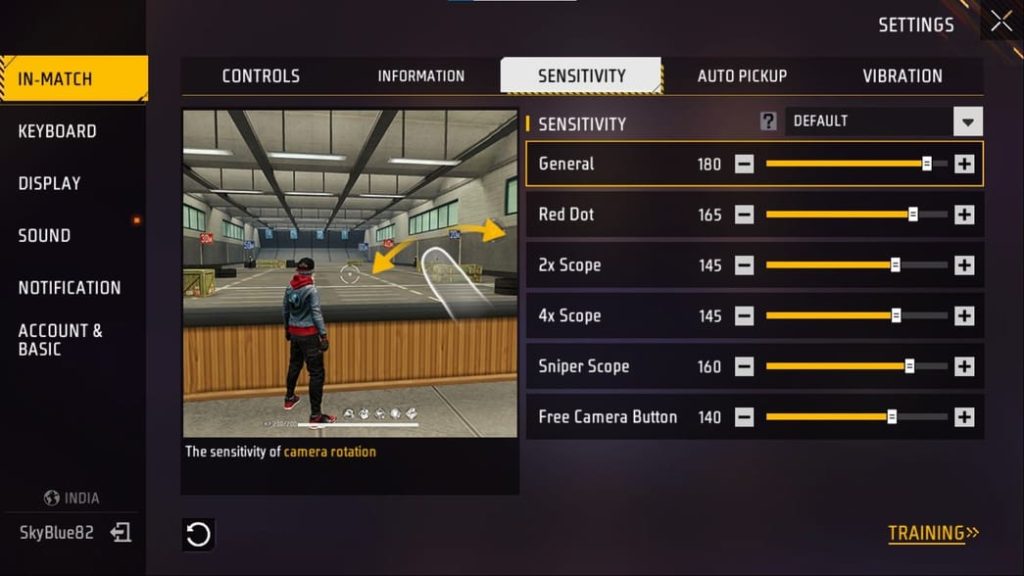
Step 3: Tweak Scope Sensitivity Separately
Scope settings are critical for mid-to-long range. Many players copy general sensitivity but forget scopes. For the red dot, keep it close to your general. For 4x and sniper, lower values give you more control. Tested players often use 45–55 for 4x and 25–35 for sniper scopes. This prevents over-flicking when you’re aiming at a distant head.

Step 4: Test in Practice Mode
Head to the practice range and pick up an AR (like M4 or AK). Stand in front of a stationary target and move your aim left to right. Is the crosshair moving exactly where you want? Try drag shots—flick from a stationary position to a moving target. If you overshoot, lower sensitivity; if you undershoot, increase it. Spend at least 5 minutes here. The more you test, the better your muscle memory will adapt.
We strongly recommend using the practice range every time you change settings. Sure, you could jump into a match, but you’ll die before you even notice if the sensitivity is off. Plus, the practice range has moving bots that mimic real enemy movement. Use this time to perfect your flick shots and tracking.
Step 5: Fine-Tune for Your Playstyle
The numbers above are a starting point. Now, adjust based on how you play. If you’re a rusher who loves close combat, keep general high and red dot near 90. If you prefer sniping from distance, lower your sniper scope to 25–30. Support players might want moderate general sensitivity with higher 4x for mid-range sprays. Remember, there’s no one-size-fits-all—even pro players tweak their settings.
If you want a more structured approach, check out our dedicated guides: for absolute newbies, our beginner sensitivity settings; for buttery-smooth aim, the smooth sensitivity settings; and if you’re pushing for the highest rank, the grandmaster sensitivity settings are a must-try. For specific techniques like drag shots, our drag shot headshot settings cover the exact values pros use.
Common Pitfalls
- Copying settings from a YouTuber without adjusting for your device size and screen refresh rate. What works on an iPhone might feel sluggish on a budget Android—always tweak after copying.
- Changing too many numbers at once. If you alter general, red dot, and scopes in one go, you won’t know which slider caused the improvement or the disaster. Change one setting, test, then move on.
- Ignoring the fire button sensitivity. Many players forget that the fire button size and placement affect how quickly you can tap. Make sure it’s big enough and placed where your thumb naturally rests.
Where to Next
You’ve got tested settings and a method to refine them. Now, it’s all about repetition. Spend a few minutes in the practice range before each session, and your aim will become second nature. If you want to go deeper, look into our sensitivity settings in practice mode for a dedicated testing routine, and stable crosshair settings for even tighter spray control. Good luck out there—see you in the winners’ circle!



