If you want to compete in Free Fire esports – whether it’s Clash Squad ranked or custom scrims – your sensitivity settings are the foundation of your aim. Get them right, and you’ll land more headshots, control recoil like a pro, and outmaneuver opponents without overshooting. Get them wrong, and even the best strategy won’t save you.
This guide walks you through the exact sensitivity values used by top-tier esports players. You’ll learn how to set up your general, scope, and free look sensitivities, plus how to test them in training mode. By the end, you’ll have a custom setup that feels natural and gives you an edge in every fight.
What You’ll Need
- A device running Free Fire or Free Fire Max (Android/iOS)
- The game installed and updated to the latest version
- At least 30 minutes of free time for testing
- A training ground or practice match access
- Optional: a screen recorder to compare before/after
Step 1: Set Your General Sensitivity
General sensitivity controls how fast your camera moves when you’re not aiming down sights. Pro players usually keep this high for quick 360 checks and flick shots. Start with these values and adjust from there:
- Camera Sensitivity: 100–110 (for fast turnarounds)
- ADS Sensitivity: 95–105 (keeps recoil control manageable)
- Gyroscope Sensitivity (if you use gyro): 80–90 (for fine adjustments)
Step 2: Tweak Your Scope Sensitivities
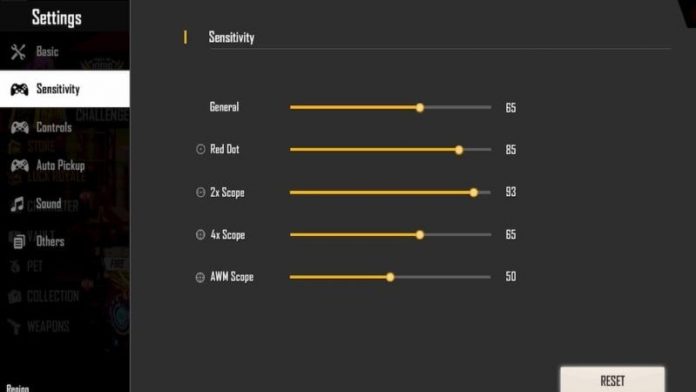
Each scope behaves differently. For esports, you want slower sensitivity on higher scopes to maintain accuracy. Here’s a solid baseline:
- Red Dot / Holographic: 95–100
- 2x Scope: 85–90
- 4x Scope: 70–75
- Sniper Scope: 50–60 (for stable long-range shots)
Test these in the training ground by spraying at a wall. If your crosshair bounces too much, lower the values. If you can’t track a moving target, increase them slightly.
Step 3: Fine-Tune Fire Button Sensitivity
The fire button sensitivity affects how your aim behaves while shooting. For spray control, you want enough speed to track an enemy but not so much that you overcorrect. Most pros keep fire button sensitivity around 80–85. If you use a three-finger claw setup, you might want separate values for your index finger tap – check out our detailed guide on free fire sensitivity settings for spray control for exact numbers.
Step 4: Adjust Free Look Sensitivity
Free look lets you check surroundings without changing your movement direction. In esports matches, this is crucial for map awareness. Keep free look sensitivity around 70–80 so you can scan quickly without losing orientation. For a deeper dive, read our guide on free fire free look sensitivity settings.
Step 5: Test in Training Ground
Now it’s time to put your settings to the test. Go to the training ground and practice these drills:
- Spray at a wall from 20 meters – the bullet hole pattern should be tight and consistent
- Track a moving target (like the bot) while shooting – your crosshair should stay on target
- Practice jump shots – your aim should stay level even while jumping. For more, see free fire sensitivity settings for jump shots.
- Try quick scoping with a sniper – flick to a target and fire without overshooting
If your spray pattern is too wide, lower your ADS sensitivity. If you can’t flick quickly to a target, raise your general camera sensitivity. Keep adjusting until it feels right.
Step 6: Save and Export Your Settings
Once you’re happy, save your sensitivity as a backup code. Go to Settings → Sensitivity → Backup Code, then tap ‘Copy Code’. Share it with friends or save it for later. If you want to load the same settings on another device, learn how to import free fire sensitivity settings. Also, if you’re looking for a balanced approach for everyday play, check out free fire sensitivity settings balanced sensitivity.
Common Pitfalls
- Setting sensitivity too high: This leads to over-aiming and missing shots. Always start lower and increase gradually.
- Ignoring gyroscope: Gyro helps with micro-adjustments. Even a small setting (50-60) can improve accuracy significantly. Many pros rely on it.
- Not practicing enough: Changing sensitivity every day won’t let your muscle memory develop. Stick with a setup for at least a week before tweaking.
Where to Next
Now that your sensitivity is dialed in, you can focus on other skills. Check out our guide on free fire max sensitivity settings for headshot to land more one-taps, or explore advanced techniques like auto headshot setups with free fire sensitivity settings for auto headshot samsung. Keep practicing, and see you on the battlefield!



