If you’re the type of player who rushes into fights, loves quick 180 turns, and wants to land flicks before your opponent can react, then you need sensitivity settings built for speed. This guide is for aggressive free fire players who want to move like lightning without losing control. By the end, you’ll have a custom sensitivity profile that lets you zip across the map, snap onto targets, and still keep your bullets on track.
Fast doesn’t mean reckless. The settings here are tuned to give you high sensitivity for rapid movement and aim, but with enough stability to handle mid-range sprays. We’ll walk through each slider step by step, from general sensitivity to scope adjustments. Ready to turn up the speed? Let’s get started.
What You’ll Need
- Free Fire installed on your device (latest version).
- A decent internet connection for smooth gameplay.
- Access to the Training Ground to test your settings.
- Patience – you’ll need to fine-tune and practice.
- Optional: a device with a high refresh rate for smoother aim.
Step 1: Reset Your Current Sensitivity to Default
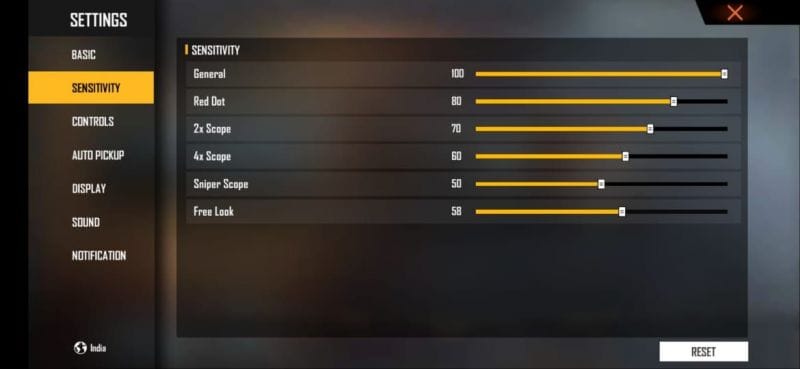
Before we start cranking up the numbers, it’s smart to wipe the slate clean. Go to Settings > Sensitivity and tap the ‘Reset’ button. This removes any old tweaks that might interfere with your new fast settings. Starting from default ensures you only build on the baseline.
Step 2: Set General Sensitivity to 85-90
General sensitivity controls your camera movement when you’re not aiming down sights. For fast players, this needs to be high – we recommend 85 to 90. With this, you can do a full 180 turn in a split second, perfect for checking corners and reacting to enemies behind you. Move the slider to 85, then test in the training ground. If it feels too slippery, drop to 80; if you want even more speed, go up to 90.
Step 3: Red Dot and 2x Scope Sensitivity (70-80)
When you aim with a red dot or 2x scope, your aim speed needs to be snappy. Set Red Dot sensitivity to 70-80 and 2x scope to 65-75. These ranges allow you to snap onto moving targets quickly while still being able to control recoil. Start at 75 for red dot and 70 for 2x, then adjust based on how easy it is to track enemies.
Step 4: 4x Scope and Sniper Scope (40-50)
For longer range engagements, you don’t want crazy speed – you need control. Set 4x scope to 40-50 and Sniper scope to 30-40. This lower sensitivity helps you keep the crosshair steady when peeking and firing at distance. Fast players still encounter long-range fights, so don’t neglect these.
Step 5: Free Look Sensitivity (Camera) at 80-85
Free look sensitivity lets you look around while running or driving. For speed demons, high free look is essential – set it to 80-85. This allows you to scout the battlefield quickly without changing your movement direction. It’s especially useful when you hear footsteps behind you.
Step 6: Fine-Tune in Training Ground
Now head to the Training Ground and put your settings to the test. Pick an AK or M4 and practice these drills: 1) Spin 180 degrees and shoot a stationary target. 2) Track a moving bot while strafing. 3) Quickly aim from one target to another. If your crosshair overshoots or you can’t control recoil, lower the respective sensitivity by 5 points. If you feel sluggish, bump it up. Spend at least 10 minutes tweaking until it feels natural.
Common Pitfalls
- Setting everything too high: Ultra-high sensitivity can make your aim shaky and hard to control. If you’re missing easy shots, dial back by 5-10 points.
- Ignoring free look sensitivity: A low free look will slow down your awareness, especially in close quarters. Always match it to your general sensitivity.
- Not practicing enough: Setting numbers alone won’t make you a fast player. You need to build muscle memory through repeated drills in the training ground.
Where to Next
Now that you’ve got your fast sensitivity dialed in, check out more specialized guides. For close-range dominance, read our free fire sensitivity settings for close range. If you want to eliminate recoil entirely, try free fire sensitivity settings zero recoil. And for tournament-level setups, see competitive free fire sensitivity settings. Also, if you use a gaming mode, consider free fire sensitivity settings with gaming mode for extra smoothness. Keep practicing and tweaking – your speed will only get faster.



