Close-range fights in Free Fire are all about speed and precision. Whether you’re rushing with an MP40 or hip-firing a M1014, your sensitivity settings make or break your reaction time. This guide is for players who want to improve their CQB (close quarter battle) performance—specifically for SMGs, shotguns, and hip-fire encounters. By the end, you’ll have a custom sensitivity profile that helps you track targets, snap onto enemies, and win those 1v1 duels consistently.
We’ll walk through each slider, explain why close range demands higher sensitivity, and give you tested numbers to start with. No fluff, just actionable steps. If you’re tired of losing close fights because your aim feels sluggish or jerky, this is for you.
What You’ll Need
- Free Fire or Free Fire Max installed on your device
- 10–15 minutes in the Training Ground (or a Classic match to test)
- A notepad or notes app to record your settings
- Patience to tweak and test (don’t expect magic after one change)
- Optional: a friend to practice 1v1 in a custom room
Step 1: Understand Why Close Range Needs Higher Sensitivity
In close fights, enemies move fast—strafe left and right, jump, slide. Your crosshair needs to keep up. High sensitivity means you can turn quickly and track unpredictable movement. But too high and you’ll overshoot. The sweet spot lets you flick to targets without losing control. For context, the best free fire sensitivity settings for android often recommend 90–100 for general, but close range may need even more on the red dot and scope settings.
Step 2: Reset to Default (Optional but Recommended)
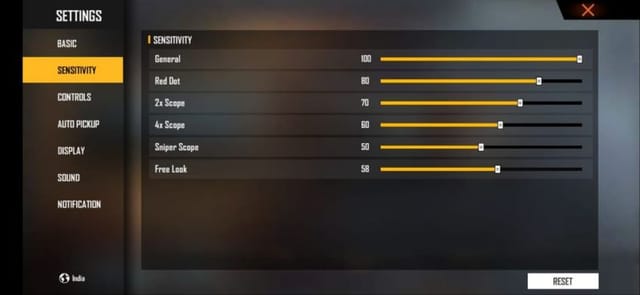
If you’ve been messing with settings, start fresh. Go to Settings > Sensitivity and tap ‘Restore Default’. This clears any conflicting numbers. Don’t worry—you can always go back. If you already have a base you like, skip this step. But for a clean slate, defaults are your friend.
Step 3: Set General Sensitivity (The Foundation)
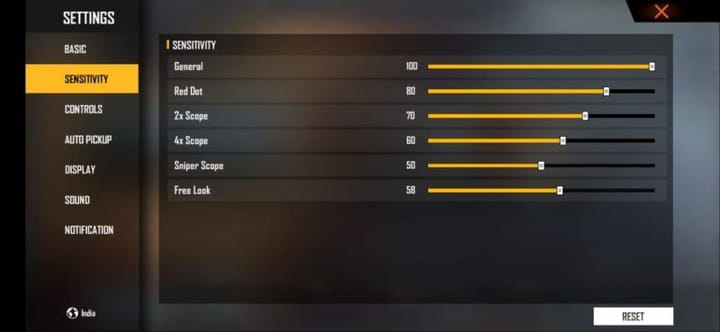
The General sensitivity controls your look speed when not aiming down sights (ADS). For close range, you want this high so you can react to enemies appearing from the side. Start at **90**. If you use a device with a high refresh rate, push it to 95–100. This setting affects hip-fire and the initial flick before you ADS. Test in Training Ground: stand close to a moving target and try to keep your crosshair on it while strafing. If you over-rotate, drop by 2–3 points. If you’re too slow, increase by 2.
Step 4: Adjust Red Dot and Scope Settings
Red Dot and 2x scope are most common for close-mid range. Set them **5–10 points higher** than your General sensitivity for quick target acquisition. For example, if General is 90, set Red Dot to 95 and 2x to 90. The 4x and above are rarely used in CQB, so you can leave them lower (70–80) to avoid overscoping. Shotguns and SMGs benefit from high Red Dot sensitivity—this is where the free fire sensitivity settings for smg really shine. Test by snapping between two dummy heads quickly in Training Ground.
Step 5: Fine-Tune with Gyroscope (If You Use It)
Gyro adds a layer of control by tilting your device. For close range, set gyro sensitivity to **50–70%** of your normal sensitivities. This helps with micro-adjustments when you’re already aimed at an enemy. To activate, go to Settings > Sensitivity > Gyroscope and turn it on. Then set Red Dot gyro to 50–60, 2x gyro to 40–50. Practice hip-firing by tilting your phone—it feels weird at first but becomes second nature. For more on this, check out the competitive free fire sensitivity settings guide which covers gyro in depth.
Step 6: Test in Real Matches and Adjust
Training Ground is great, but real matches have lag, pressure, and unpredictable movement. Play 3–5 Clash Squad or Classic matches focusing only on close fights. Pay attention: Are you missing shots because you’re overshooting? Lower Red Dot by 5. Are you too slow to turn on an enemy behind you? Increase General by 3. Keep tweaking until it feels like your crosshair is an extension of your thumb. Remember, the free fire sensitivity settings after update may require recalibration—always check after patches.
Common Pitfalls
- Overcompensating: Setting everything to 100 makes your aim jittery. High sensitivity needs a steady hand and good crosshair placement. Start lower and increase gradually.
- Ignoring device performance: Low FPS (below 30) makes high sensitivity feel sluggish or choppy. Enable Game Mode or use the free fire sensitivity settings with gaming mode to optimize. If your phone struggles, lower graphics before touching sensitivity.
- Not adjusting per weapon: SMGs and shotguns require different flicks. An MP40 needs quick vertical control, while a M1014 needs wide horizontal sweeps. The free fire sensitivity settings smooth recoil guide can help you fine-tune per weapon.
Where to Next
Now that you have a close-range foundation, tailor it further. If you main SMGs, dive into the free fire sensitivity settings for smg guide for weapon-specific numbers. For overall consistency, check out the best free fire sensitivity settings for android. And if you want to compete at a higher level, the competitive free fire sensitivity settings article will push your aim even further. Happy fragging!



