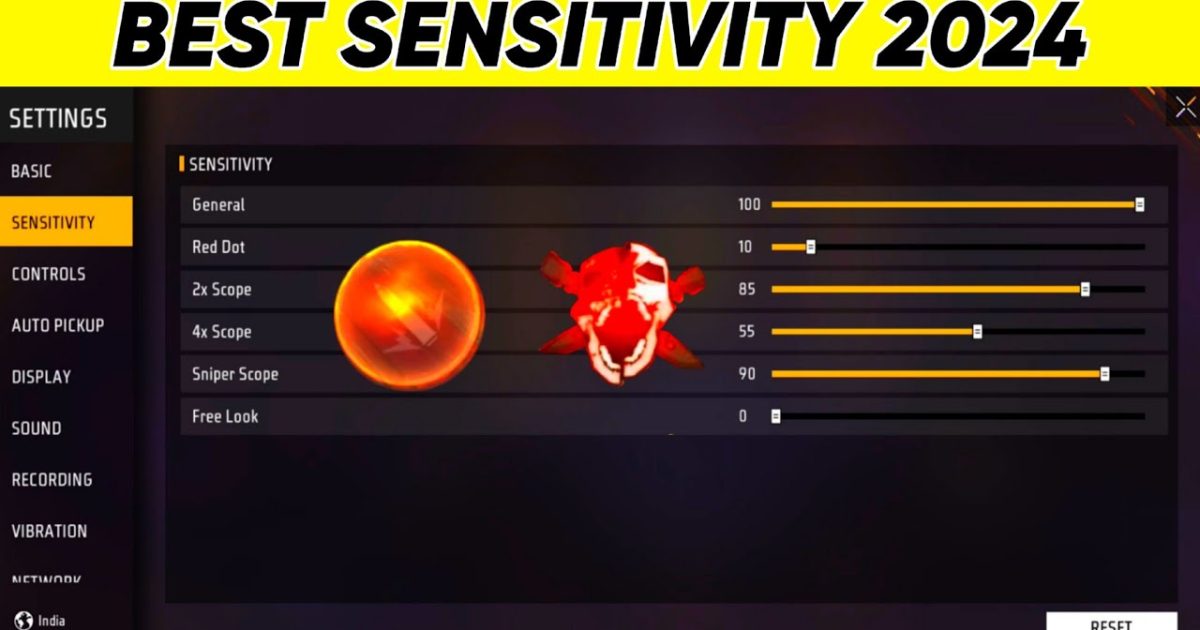
You’ve probably seen streamers flick onto enemies like it’s nothing, and you wonder: what sensitivity are they using? The truth is, the trending Free Fire sensitivity settings aren’t a secret — they’re based on the same principles pro players have tested for months. This guide breaks down the actual values that are dominating ranked lobbies right now, so you can copy them, tweak them, and start winning more gunfights.
By the end of this tutorial, you’ll have a complete set of sensitivity numbers (General, Red Dot, 2x+4x scope, and Free Look) that you can paste into your own game. We’ll also show you how to test them in the training ground so you don’t mess up your muscle memory. Whether you’re a claw player or a two-thumb legend, these settings work. Let’s dive in.
What You’ll Need
- Free Fire installed and updated (latest version)
- A stable internet connection (ping matters for aim)
- 15–20 minutes of uninterrupted practice time
- A note-taking app or paper to save your custom code
Step 1: Access the Sensitivity Menu
First, open Free Fire and tap the gear icon on the main lobby screen to go to Settings. Then select the ‘Sensitivity’ tab — it’s the one with the crosshair icon. If you’ve never touched this menu before, you’ll see default values around 50–60. We’re going to change every slider based on the trending pro setup.
Step 2: Adjust General Sensitivity
General sensitivity controls your default look speed when not aiming down sights. For 2025, most top players set this between 75–85. Start at 80 — it’s fast enough to turn quickly but still controllable. If you have a small phone screen, you might prefer closer to 85. Don’t go below 70 or you’ll feel sluggish. If you want a more conservative starting point, check out our simple baseline settings guide for a self-calibration method.
Step 3: Set Red Dot and 2x+4x Scope Sensitivity
Red Dot sensitivity is crucial for close to mid-range fights. The trending value is around 65–75. Start at 70 and adjust based on your recoil control. For 2x and 4x scopes, pros use slightly lower numbers to avoid over-flicking: try 55–65. Remember, the goal is to keep your crosshair steady while tracking a moving target. If you tend to overshoot, lower the value by 5. For more aggressive play, our fast turning sensitivity settings are tuned for close-quarters dominance.
Step 4: Configure Free Look and Fire Button Sensitivity

Free Look sensitivity lets you glance around while running — keep it at 70–80 so you can spot enemies without breaking stride. Fire button sensitivity isn’t a slider, but you can adjust the position and size. Place the fire button low on the right side if you play with thumbs, or use the ‘separate fire button’ option for claw. This isn’t technically a sensitivity setting, but it impacts your aim speed. For top-tier configurations used in tournaments, browse our esports-tested settings.
Step 5: Test and Fine-Tune in Training Ground
Now the real work begins. Head to the Training Ground and pick a weapon you use most — the M1887 or Woodpecker, for example. Try to track moving targets and snap between dummies. If you feel your aim is jerky, lower general or scope sensitivity by 5. If you can’t turn fast enough to hit someone running past, increase it. Change one slider at a time and play a few matches. The latest sensitivity patch from Garena actually changed some defaults, so compare yours to the new numbers. Also, if you’re on an iPhone, our iPhone-tested settings can give you a head start with device-specific values.
Common Pitfalls
- Copying settings blindly without testing. What works for a pro on a 90Hz iPad may feel wrong on your 60Hz Android. Always adjust to your own feel.
- Changing too many sliders at once. You won’t know which change caused the improvement or disaster. Stick to incremental tweaks.
- Ignoring DPI and screen size. Higher DPI phones (like gaming phones) need lower sensitivity. For a detailed breakdown, see our auto headshot settings guide which accounts for device differences.
Where to Next
You’ve now got the trending sensitivity values that are winning games right now. But don’t stop here — head over to our other guides to fine-tune your loadout, practice your claw grip, or learn how to export your settings so you never lose them. Good luck, and see you on the battlefield.



