Hey kids! If you’re playing Free Fire and finding it hard to aim or control your character, you’re not alone. This guide is made just for you—simple, step-by-step settings that are easy to use. We’ll show you how to adjust your sensitivity so you can win more matches without getting frustrated.
By the end of this guide, you’ll have a custom sensitivity setup that feels comfortable for your fingers. We’ll also share some tips to avoid common mistakes. Let’s get started!
What You’ll Need
- A phone or tablet (midrange phones work great – check our guide for those)
- Free Fire installed and updated
- A little patience (maybe a parent’s help the first time)
- Access to the training mode in Free Fire
Step 1: Open Free Fire and Go to Settings
Launch Free Fire on your device. On the main screen, look for the gear icon in the top-right corner. Tap it to open Settings. This is where all the magic happens.
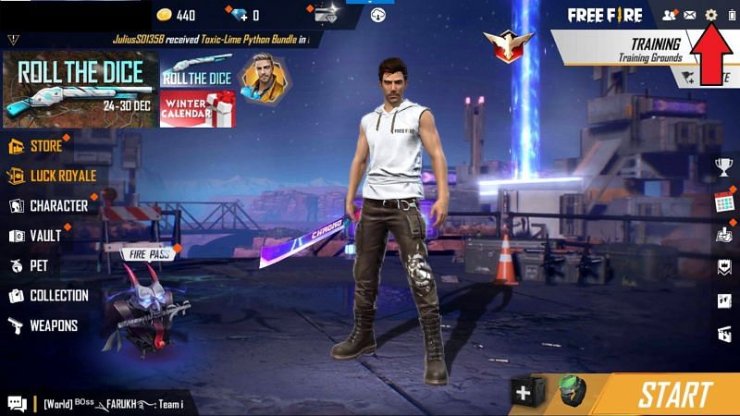
Step 2: Find the Sensitivity Tab
Inside Settings, you’ll see several tabs at the top. Tap on ‘Sensitivity’. It usually has a crosshair icon. This screen shows all the sliders you can adjust.
Step 3: Set General Sensitivity to Low
The first slider is ‘General’ sensitivity. For kids, a low setting between 50-60 is best. This makes your camera move slowly, so you can aim more accurately. Drag the slider to 55. If that feels too slow, you can nudge it up a bit later.
Step 4: Adjust Red Dot and 2x Scope Sensitivity
Next, set ‘Red Dot’ and ‘2x Scope’ sensitivity to around 50-55 as well. These scopes are common in close-to-mid range fights. Keeping them low helps you stay on target. If you want even easier recoil control, check out our no recoil settings.
Step 5: Set 4x and Sniper Scopes Even Lower
For long-range scopes like 4x and sniper, set sensitivity between 30-40. These need more precision, so slower movement is better. This also helps with stable sensitivity settings for consistent aim.
Step 6: Test in Training Mode
After you’ve set everything, it’s time to test. Go to the main menu and tap ‘Training’. Here you can shoot at targets and move around. Try different guns to see if your sensitivity feels comfortable. Practice close range settings by running up to targets quickly. If you have gaming mode on your phone, turn it on for smoother performance – read about gaming mode settings.
Common Pitfalls
- Setting sensitivity too high: This causes you to overshoot targets and miss shots. Keep it low and increase slowly.
- Copying pro settings without adjusting: Pros use high sensitivity because they have lots of practice. You need your own comfortable settings.
- Not saving after changes: Always tap the ‘Save’ button before exiting. Otherwise your settings will reset.
Even with low sensitivity, you can still get headshots! Practice makes perfect. For more advanced tricks, check our auto headshot settings guide.
Free Fire Kid Pro
Where to Next
Great job setting up your sensitivity! Now jump into a match and have fun. Remember, everyone starts somewhere. Keep practicing and you’ll improve. For more tips, explore our other Free Fire guides.



