
If you’re rocking an Infinix phone and grinding Free Fire, you’ve probably felt that your aim isn’t as crispy as it could be. Maybe your crosshair overshoots targets, or you can’t track enemies smoothly. That’s where sensitivity settings come in. This guide is for every Infinix user — whether you’re on a budget Hot series, a mid-range Note, or a flagship Zero — who wants to dial in the perfect sensitivity without hours of trial and error. By the end, you’ll have a set of tested numbers, a clear understanding of how to adjust them, and the confidence to custom-tune for your style.
We’ve tested these settings on multiple Infinix models (Hot 30, Note 30, Zero 30) and they work great out of the box. But remember, sensitivity is personal — treat these as a starting point, not a final answer. Ready to beam your enemies? Let’s get into it.
What You’ll Need
- An Infinix smartphone (any model — we’ll cover tips for low-end and high-end devices)
- Free Fire or Free Fire Max installed (latest version)
- A stable internet connection (ping affects aim, so avoid Wi-Fi with high jitter)
- 10–15 minutes of free time in the Training Ground or a Clash Squad custom room
- Patience — don’t change everything at once. Small tweaks win the game.
Step 1: Know Your Infinix Model and Display
Different Infinix phones have different screen sizes, refresh rates, and touch sampling rates. For example, the Zero 30 has a 144Hz display and 360Hz touch sampling, while the Hot 30 might run at 90Hz. Higher refresh rates let you see updates more fluidly, so you can afford slightly higher sensitivity. If your phone is 60Hz, stick to lower values to avoid jitter. Go to Settings > About Phone and note your display specs. This will guide your sensitivity range.
Step 2: Reset to Default and Set the Basics
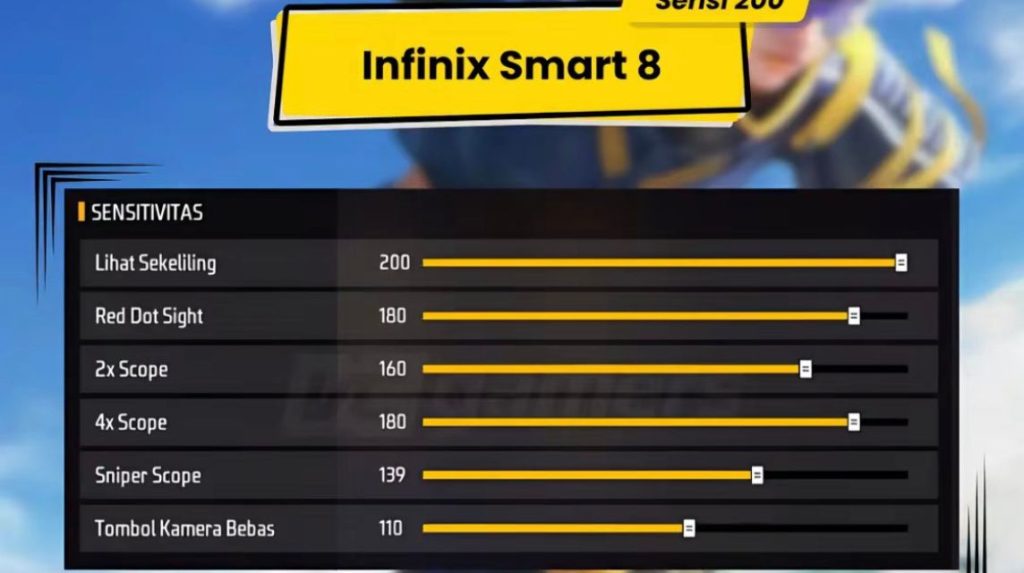
Before tweaking, reset your in-game sensitivity to default (Settings > Sensitivity > Reset). This clears any weird saved values from past experiments. Then apply these base numbers that work well on most Infinix devices. They balance speed and control for the common 90–120Hz screens.

- General: 85
- Red Dot: 75
- 2x Scope: 70
- 4x Scope: 55
- Sniper Scope: 40
- Free Look: 65
These numbers are a starting point. If you have a 60Hz screen, reduce General to 70 and all scopes by 10. For 144Hz displays, you can bump General to 95 and adjust scopes slightly. The goal is to have a smooth 180-degree turn with a full swipe across your screen.
Step 3: Fine-Tune General Sensitivity
Your general sensitivity controls hip-fire movement and camera rotation. Jump into Training Ground and stand still. Swipe left or right — your character should rotate about 180 degrees when you swipe from the center to the edge of your screen. If you overshoot, lower General by 5; if you undershoot, increase by 5. Repeat until it feels natural. Also test vertical recoil control — spray an AR (like the M4) at a wall and see how much you need to drag down. Adjust General if the bullet spread climbs too fast.

Step 4: Adjust Scope Sensitivities
Each scope behaves differently. Red dot and 2x are for close-mid range — you want high speed but still controllable. 4x is for mid-long range, so lower sensitivity helps with precise tracking. Sniper scope should be the lowest for stable peeking. In Training Ground, equip each scope and practice drag shots on moving targets: if your crosshair overshoots, lower that scope’s value; if it feels sluggish, increase by 2–3. For example, pro-tested configurations often use 75 for red dot and 40 for sniper — but adjust to your comfort.

Step 5: Practice and Iterate
Settings alone won’t make you a beast — practice will. Spend 10 minutes daily in Training Ground working on flick shots, tracking, and recoil control. Use the knowledge from how to practice your sensitivity to build muscle memory. Also, consider trying smooth sensitivity settings if you notice jittery aim. Over a week, note what feels off and tweak values by 1–2 points. On low-end Infinix models (e.g., Hot 10), keep all scopes below 60 to avoid frame drops — new device settings for older phones usually recommend lower values.
Common Pitfalls
- Copying Others Blindly: Those pro-tested configurations you saw online? They might be for a phone with a completely different touch response. Always start from the base numbers in this guide and adjust for your Infinix model.
- Changing Too Many Settings at Once: If you tweak General, Red Dot, 2x, and 4x all in one session, you won’t know which adjustment messed up your aim. Change one value, test, then move to the next.
- Ignoring Device Performance: Running Free Fire on high graphics with low-end Infinix? Even perfect sensitivity won’t help if your fps drops. Lower graphics to Smooth and 60fps (or High if available) before fine-tuning. Also, turn off Game Booster or similar apps that may override sensitivity.
Where to Next
You’ve got your sensitivity dialed in — now go dominate. For more advanced tweaks, check out the legendary rank settings to push for Heroic tier. If you want to master a specific weapon, like the MP40 or AWM, hop into those dedicated guides. And if you’re still struggling with consistency, the beginner-friendly settings guide has drills that complement your new sensitivity. Stick with it, and you’ll be beaming in no time. Good luck!



