Ranked mode in Free Fire is no joke. You’re facing players who know every corner, every glitch, and every trick to take you down. If you’re still using default sensitivity settings, you’re putting yourself at a major disadvantage. This guide is for anyone who wants to climb the ranks—whether you’re a Heroic aspirant or just trying to get out of Platinum. By the end, you’ll have a tailored sensitivity setup that balances speed and control, giving you the edge in every engagement.
We’ll walk through the exact numbers that top-ranked players use, but more importantly, you’ll learn how to tweak them for your own device and playstyle. You’ll leave with a custom sensitivity profile that helps you snap onto enemies, control recoil like a pro, and react faster than your opponents. Let’s get started.
What You’ll Need
- A smartphone running Free Fire (any model works, but older devices may need lower settings)
- Free Fire app updated to the latest version
- Access to the Practice Range (tap ‘Practice’ on the home screen)
- A few minutes of uninterrupted time (10–15 minutes should be enough)
- Optional: a note-taking app or paper to jot down your starting numbers
Step 1: Reset Your Current Settings
Before we change anything, let’s wipe the slate clean. Open Free Fire, go to Settings (the gear icon in the top right), then tap the ‘Sensitivity’ tab. Look for the ‘Reset’ button—usually a small circular arrow at the top right of the sensitivity section. Tap it to restore default values. This ensures we’re starting from a known baseline, and you won’t have any leftover tweaks messing with your new setup.
Step 2: Set General Sensitivity Base
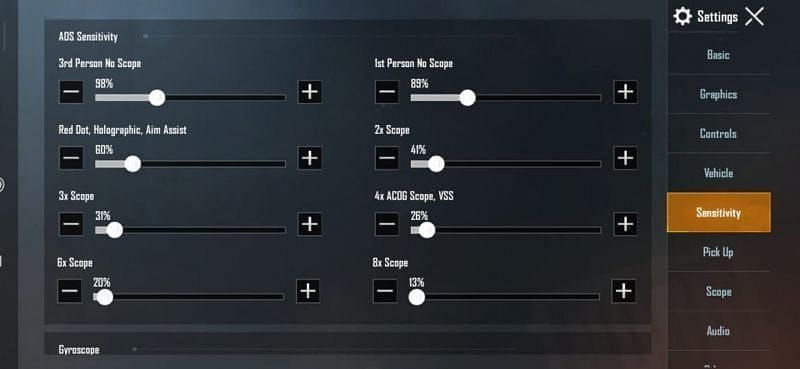
General sensitivity controls your camera movement when not aiming down sights. For ranked mode, you want it high enough to flick between targets quickly, but not so high that you overshoot. Start with General sensitivity at 90. If you’re using a device like a Redmi that tends to drag a bit, you might want to check out our guide for best free fire sensitivity settings for redmi. But for now, 90 is a great starting point. Next, set Red Dot sensitivity to 85—this is your go-to for most fights at medium range.
Step 3: Adjust 2x and 4x Scope Sensitivities
Scoped sensitivity is where the real magic happens. For 2x scope (common for ARs in ranked), set it to 75. For 4x scope (used on DMRs or snipers at mid-long range), go with 65. These numbers give you enough precision to track moving enemies without losing control. If you’re a rush player who loves close combat, you might prefer our rush sensitivity settings for even faster reactions.
Step 4: Fine-Tune Sniper Scope and Free Look
The sniper scope (8x and above) should be lower to avoid shaky aim. Set it to 50. For Free Look (while running or parachuting), keep it at 70—high enough to spot enemies without disorienting yourself. If you’re a non gyroscope user, these values work perfectly without gyro, but you can still gain from our dedicated non gyroscope settings guide.
Step 5: Test and Adjust in Practice Range
Now head to the Practice Range. Pick up your favorite weapon—say the M4 or AK. Try spraying at the dummy targets from different distances. If you find yourself over-flicking, reduce General sensitivity by 5 points. If you’re under-flicking, increase it by 5. Do the same for each scope until the aim feels crisp. This is where a custom sensitivity guide becomes your best friend. Spend at least 10 minutes here; it makes all the difference.
Common Pitfalls
- Setting sensitivity too high: High sensitivity may seem fast, but in ranked mode, accuracy beats speed. Over-flicking will lose you gunfights. Lower your general sensitivity if you can’t stay on target.
- Ignoring device performance: Old or low-end devices may struggle with high sensitivity due to frame drops. If you experience lag, reduce all values by 10–15 points. Check our guide for frame drops if that’s an issue.
- Not adjusting per scope: Using the same sensitivity for all scopes is a rookie mistake. Each zoom level needs different speed for consistent aim. Always fine-tune individually.
Where to Next
You now have a solid sensitivity base for ranked mode. But remember, sensitivity is personal—don’t be afraid to keep tweaking. If you want to dive deeper, check out our dedicated guide for hardcore players, or if you need more precision, our precision aim settings might help. And if you’re on a Redmi device, don’t miss the best free fire sensitivity settings for redmi. Good luck climbing the ranks!



