If you play Free Fire on a device with low DPI (like 160 or 240), you know the struggle: your crosshair moves slow, tracking enemies feels clunky, and spraying bullets becomes a gamble. This guide is for you—the player stuck with low DPI hardware who still wants to dominate. By the end, you’ll have a custom sensitivity setup that maximizes your aim, reduces recoil, and turns your tiny screen into a headshot machine.
We’re keeping it casual and tested. No fluff—just steps that work. You’ll learn how to tweak each slider, practice in the training ground, and avoid common mistakes. Ready to level up? Let’s dive in.
What You’ll Need
- Free Fire app installed (latest version)
- A device with low DPI (e.g., 160–300 DPI – check your phone’s specs)
- Stable internet connection
- 5–10 minutes in the Training Ground
- Patience to test and adjust
Step 1: Understand Your DPI and In-Game Sensitivity
Before you change anything, know your device’s DPI. Low DPI means you need higher in-game sensitivity to compensate. Think of it as leverage: a low DPI mouse or touchscreen needs a bigger multiplier to cover the same distance. Don’t worry—we’ll find the sweet spot.
To check your DPI, look up your phone model online or use an app like ‘DPI Checker’. For this guide, we assume you’re somewhere between 160–300 DPI. If unsure, our beginner settings can be a starting point.
Step 2: Set Your General Sensitivity
Go to Settings > Sensitivity. Start with these baseline numbers for low DPI: General = 90–100, Red Dot = 85–95, 2x Scope = 80–90, 4x Scope = 70–80, Sniper Scope = 50–60. These are higher than default because low DPI needs extra push. Tap ‘Apply’.
If you want even more control, our professional sensitivity settings offer fine-tuned values for experienced players.
Step 3: Adjust Scope Sensitivity Individually
Each scope needs its own tweak. For low DPI, keep red dot and 2x high, but reduce as zoom increases. For example: Red Dot 90, 2x 85, 4x 75, Sniper 55. This prevents over-flicking at long range while keeping close combat snappy.
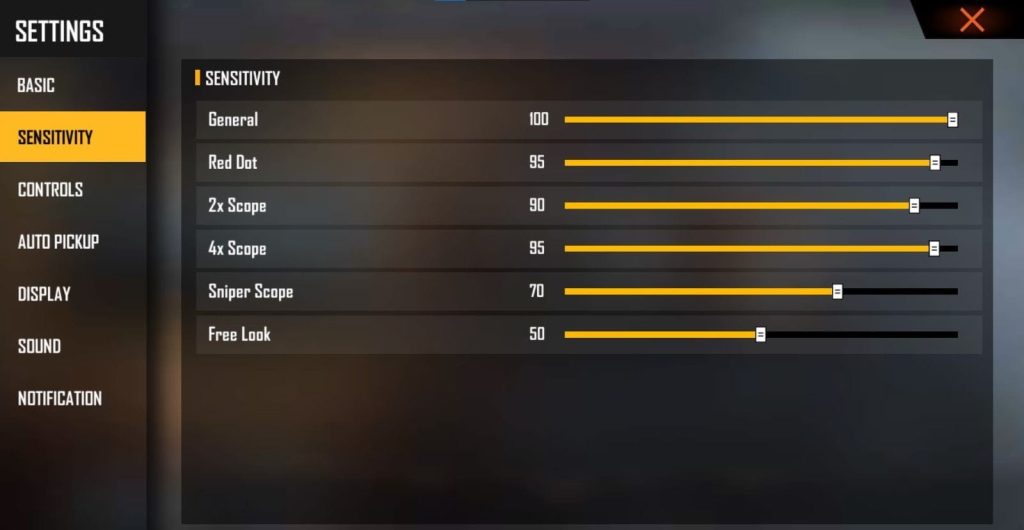
Test each scope in the Training Ground. If you drag too far, lower it; if too slow, raise by 2–3 points. For a deeper dive, check our camera sensitivity guide.
Step 4: Practice and Fine-Tune in Training Ground
Enter the Training Ground (from the main menu). Pick a gun you use most—like M4A1 or AK. Shoot at a wall to see your spray pattern. Adjust your sensitivity until the bullets group tightly. Then try tracking and flicking on moving targets.
Spray control is king. If your bullets go wild, lower your general sensitivity by 5 and test again.
Pro tip
Repeat until you feel consistent. This step can take 10–15 minutes but saves you from losing ranked matches. If you want to skip manual tweaking, you can import settings from a config file or use a config code.
Step 5: Save and Test in Real Matches
Once you’re happy in Training Ground, play a Classic or Clash Squad match. Focus on reaction time and accuracy. If something feels off, note it and adjust after the match. Don’t change during a live game—your muscle memory needs consistency.
For devices with DPI below 200, our settings for under 300 DPI have extra tweaks that might help.
Common Pitfalls
- Setting sensitivity too high: Low DPI pushes you to crank it up, but too high makes control impossible. Stick to the 90–100 max range.
- Ignoring gyroscope: If your device supports gyro, enable it (even at low strength) to add fine control. Many low DPI players benefit from gyro for micro-adjustments.
- Not adjusting per scope: Using the same sensitivity for all scopes wrecks your aim. Always customize each magnification level.
Where to Next
Now that you’ve got your low DPI sensitivity dialed in, check out our other guides to keep improving: learn about professional sensitivity settings for advanced tweaks, or explore beginner settings if you’re still getting the hang of it. For quick setup, try using a config code. Keep practicing, and see you on the battlefield!



