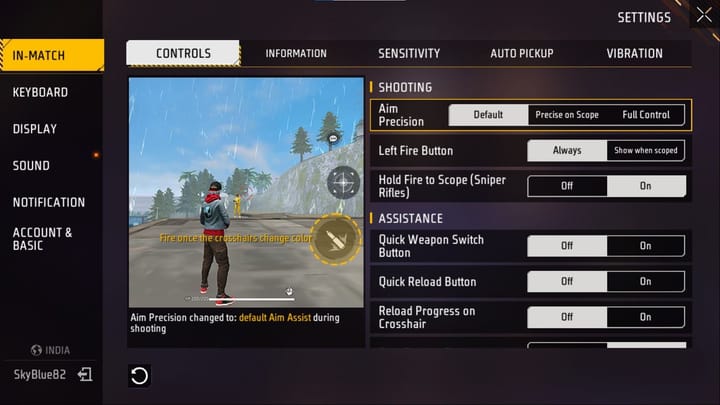
If you’re the kind of player who likes to hold a position, pick off enemies from a distance, and survive until the final zone, you’re a camper — and that’s a totally valid playstyle. The key to camping success isn’t just hiding; it’s having the right sensitivity settings to snap onto targets without moving your crosshair too much. This guide is for motivated beginners who want to master the camping style in Free Fire. By the end, you’ll have a low-sensitivity setup that keeps your aim steady, your scope on point, and your enemies guessing.
Camping requires patience and precision. Your sensitivity needs to be low enough that small hand movements don’t throw off your aim, but high enough to track a running enemy. We’ll walk you through the exact values to use, how to adjust your scope settings, and how to practice so you can hold an angle like a pro. Let’s get your settings dialed in.
What You’ll Need
- A device running Free Fire (any phone or tablet works; we’ll cover both).
- Access to the Free Fire settings menu (gear icon in the lobby).
- At least 15 minutes to test and tweak in the Training Ground.
- A friend or a bot match for real-world testing (optional but helpful).
- A note-taking app or pencil to jot down your preferred values.
Step 1: Lower Your General Sensitivity
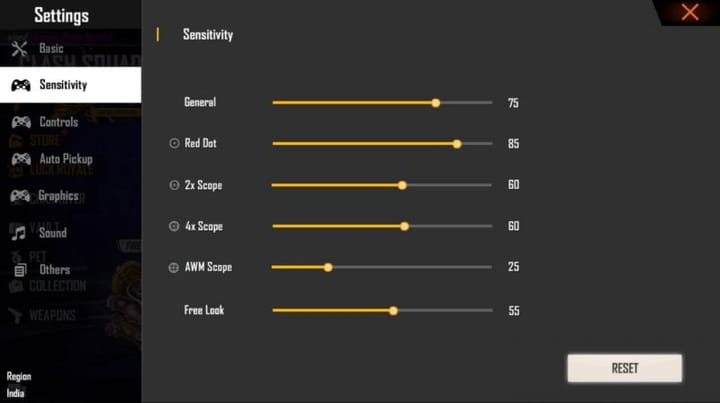
Camping rarely requires fast 360 spins. You want a general sensitivity that lets you scan your surroundings slowly and precisely. Set your General Sensitivity to around 70–80 if you’re a thumb player, or 60–70 if you use claw grip. This is lower than the typical run-and-gun setup. Open the sensitivity menu (it’s under Settings > Sensitivity) and adjust the first slider. A lower sensitivity reduces over-aiming when you peek out of cover.
Step 2: Adjust Red Dot and Scope Sensitivity
As a camper, you’ll use scopes a lot. The Red Dot sight is great for medium-range, while 4x or 6x scopes help you pick off distant targets. For Red Dot, set it to 55–65. For 2x scope, 50–60. For 4x, 40–50. For 6x, 30–40. These low values let you track moving enemies without your crosshair jittering. If you’re using a sniper, you might want even lower — around 20–30 for 8x. Remember: lower scope sensitivity keeps your crosshair steady when holding an angle.
Step 3: Fine-Tune Your ADS Sensitivity
Aiming Down Sights (ADS) sensitivity applies when you hold the aim button. For camping, you want this to be slightly lower than your general sensitivity — around 60–70. This ensures that when you scope in, you’re not swinging wildly. If you find yourself overshooting targets, lower it by 5 points. If you can’t catch up to a moving enemy, increase by 5. Test this while aiming at a practice dummy in Training Ground.
Step 4: Practice in Training Ground
Now it’s time to test. Go to the Training Ground and pick a spot behind a crate. Practice peeking and shooting at the moving targets. Try to land shots without moving your joystick much. If you feel the sensitivity is too twitchy, lower it further. The goal is to be able to hold your crosshair on a target for 2 seconds without it drifting. Also practice switching between your Red Dot and 4x scope to see if the transitions feel smooth.
Step 5: Test in Real Matches
Hop into a casual match (not ranked) and try the camping approach. Choose a building or a bush with good cover. Wait for enemies to come close or stand still. Try to engage only when you have a clean shot. After each match, reflect: Did you miss shots because the sensitivity was too low or too high? Adjust accordingly. Remember, your goal is to stay hidden and take down enemies efficiently. If you die a lot, it’s likely not the sensitivity but your positioning — but the settings help.
Common Pitfalls
- Setting sensitivity too low. While low is good for camping, going below 50 general can make it hard to react to a sudden threat from behind. Keep it at least 60.
- Ignoring scope sensitivity. Many players only adjust general sensitivity and forget scopes. That leads to jerky zoom movements. Always tune each scope individually.
- Copying others blindly. Everyone’s device and grip style differ. What works for a YouTuber might not work for you. Use the values here as a starting point, then fine-tune.
Where to Next
Now that you have a solid camping sensitivity, you might want to explore more tailored setups. Check out our defensive sensitivity settings for a slightly more aggressive camping style. If you often play alone, our solo mode settings can help you survive longer. For those using mouse and keyboard, DPI 600 settings offer precision. If you’re new to all this, start with our beginner settings. And if you want to apply these exact values quickly, learn how to import settings from a config code. Happy camping!



