Solo mode in Free Fire is a different beast. No teammates to back you up, no revives—just you against the world. If you’re a lone wolf who prefers to rely on your own skills, you know that every millisecond counts. The right sensitivity settings can make the difference between a clean headshot and a panic spray that gives away your position. This guide is for everyone who plays solo—whether you’re grinding ranked or just having fun. By the end, you’ll have a tailored sensitivity setup that helps you react faster, track enemies smoothly, and win more 1v1 duels.
We’ll walk you through the entire process, from accessing the settings menu to fine-tuning in custom rooms. You don’t need to be a pro or have a high-end device—just a willingness to test and adjust. We’ll also share common pitfalls so you don’t waste time on setups that don’t work. Ready to dominate solo queue? Let’s get started.
What You’ll Need
- Free Fire installed on your device (updated to the latest version)
- A stable internet connection
- Access to the training ground or custom room (recommended)
- Patience to test and adjust settings
Step 1: Access the Sensitivity Menu
Open Free Fire and head to the main lobby. Tap the gear icon (Settings) in the top right corner. Then select the ‘Sensitivity’ tab. Here you’ll find all the sliders we’re about to adjust. Take a screenshot of your current settings so you can revert if needed.
Step 2: Set General Sensitivity
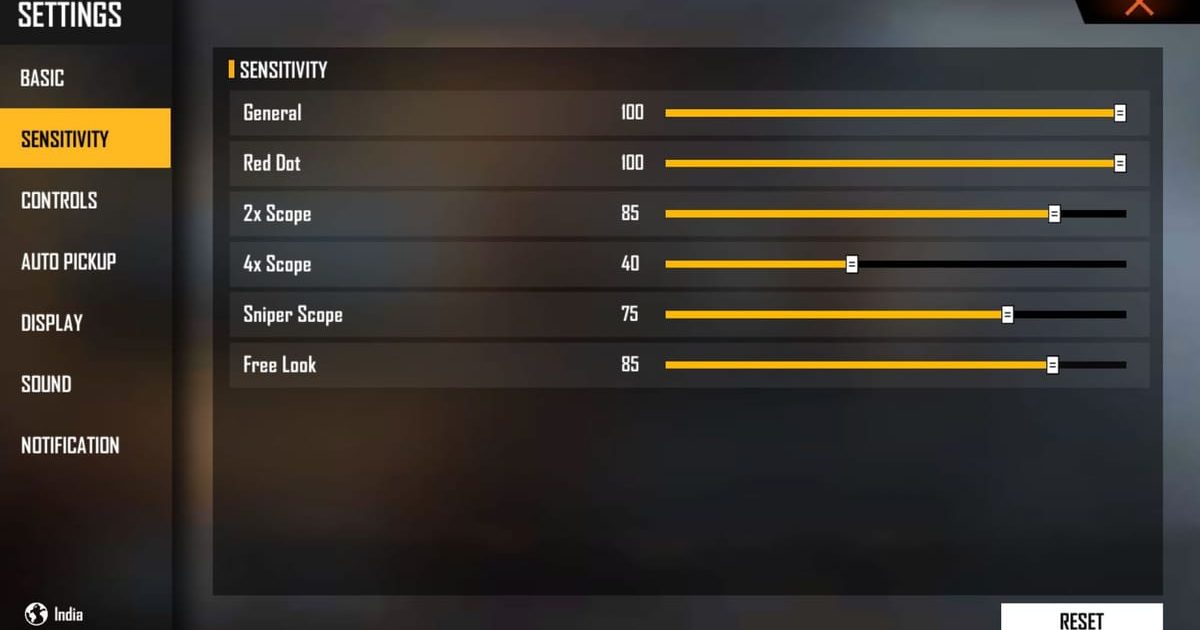
The General sensitivity controls your overall look speed when not aiming down sights. For solo mode, you want a balance between fast turning and control. Start with 85% (mid-range) and adjust up or down based on your comfort. If you find yourself overshooting targets, lower it. If you can’t flick fast enough, raise it. A good starting point is 80–90.
Step 3: Configure Red Dot and Scope Sensitivity

Red Dot: Keep it slightly lower than General for precision. Try 70–80. For 2x scope, 60–70 works. For 4x and higher, lower to 40–50. These settings help you track enemies at medium to long range without losing control. If you prefer close-range fights, you might want to check out our aggressive playstyle sensitivity for more aggressive ADS speeds.
Step 4: Adjust Gyroscope (If You Use It)

Gyroscope adds motion aiming by tilting your phone. It’s a personal preference, but many solo players use it for fine adjustments. Set the gyro sensitivity to 50% for general and 60% for red dot. If you’re new to gyro, start low and increase gradually. For those who don’t use gyro, we have a dedicated sensitivity settings without gyro guide that may suit you better.
Step 5: Fine-Tune in Custom Room
Now it’s time to test. Create a custom room and add some bots. Practice flicking to targets, tracking moving bots, and spraying at different ranges. Pay attention to how your crosshair behaves. If you notice any jitter or sluggishness, adjust the corresponding slider by 5% at a time. This is where our custom room sensitivity tests can help you structure your practice.
Step 6: Practice in Solo Mode
Take your settings into real solo matches. Don’t expect immediate perfection—you’ll need a few games to adapt. Focus on your movement and crosshair placement. If you keep dying in close-range fights, try raising your red dot sensitivity. If you miss long-range shots, lower your scope sensitivity. Remember, the perfect setting is the one that feels natural to you. If you’re starting from scratch, our beginner sensitivity settings is a great baseline.
Common Pitfalls
- Copying pro settings blindly: What works for a pro on a high-end device may not work on your phone. Always start with a baseline and adjust for your hardware and playstyle. Our popular sensitivity settings can serve as a reference, but don’t copy them exactly.
- Changing settings too often: Switching sensitivity every match prevents your muscle memory from developing. Stick with a setup for at least a week before making changes. Consistency is key.
- Ignoring ADS sensitivity: Many players only tweak general sensitivity and forget about scope sensitivities. This leads to poor aim at range. Adjust each scope individually. If you struggle with AR recoil, our AR recoil sensitivity guide has specific tweaks.
Consistency is the key. Stick with one setting for at least a week.
Pro player advice
Where to Next
You’ve got your solo mode sensitivity dialed in. Next, you might want to explore other setups for different playstyles. Check out our aggressive playstyle sensitivity for rush tactics, or our popular sensitivity settings for a well-rounded config. If you’re looking to improve further, master your camera angles and sound awareness. Good luck in your solo matches!



