
If you’ve ever felt like your shots just don’t land the same way as the pros, it might not be your skill—it could be your sensitivity settings. But here’s the thing: sensitivity isn’t one-size-fits-all. What works for a player in Indonesia with 10ms ping might feel sluggish for someone in Brazil with 150ms. This guide is for Free Fire players who want to optimize their aim based on their region’s typical latency and playstyle. By the end, you’ll have a custom-tuned sensitivity config that accounts for your server’s lag and your device’s response.
We’ve tested combinations used by top players across Asia, LATAM, Europe, and North America, then adjusted them for common ping ranges. You’ll learn how to tweak each slider—general, red dot, 2x scope, 4x scope, sniper scope, and free look—so your crosshair sticks exactly where you want it. No more overaiming because of high ping or underaiming with low sensitivity. Let’s get started.
What You’ll Need
- Free Fire installed on your device (Android or iOS)
- A stable internet connection (Wi-Fi or mobile data)
- Access to a custom room (or a friend to practice with)
- At least 30 minutes of uninterrupted practice time
- Your device’s DPI or screen resolution noted (optional but helpful)
Step 1: Understand Your Region and Ping
Before you touch any sliders, check your in-game ping. Open Free Fire, go to the main lobby, and look at the top-right corner. The number there (in milliseconds) determines how much your sensitivity needs to compensate. In regions like Southeast Asia, servers are close, so ping is often 20–40ms. That lets you use lower sensitivity for pinpoint accuracy. In Latin America, ping can spike to 100–150ms, requiring higher sensitivity to counter lag. Europe is typically 40–70ms, and North America 50–100ms. If you’re unsure, run a few training ground matches and note your average ping.
Step 2: Start with a Baseline from Popular Settings
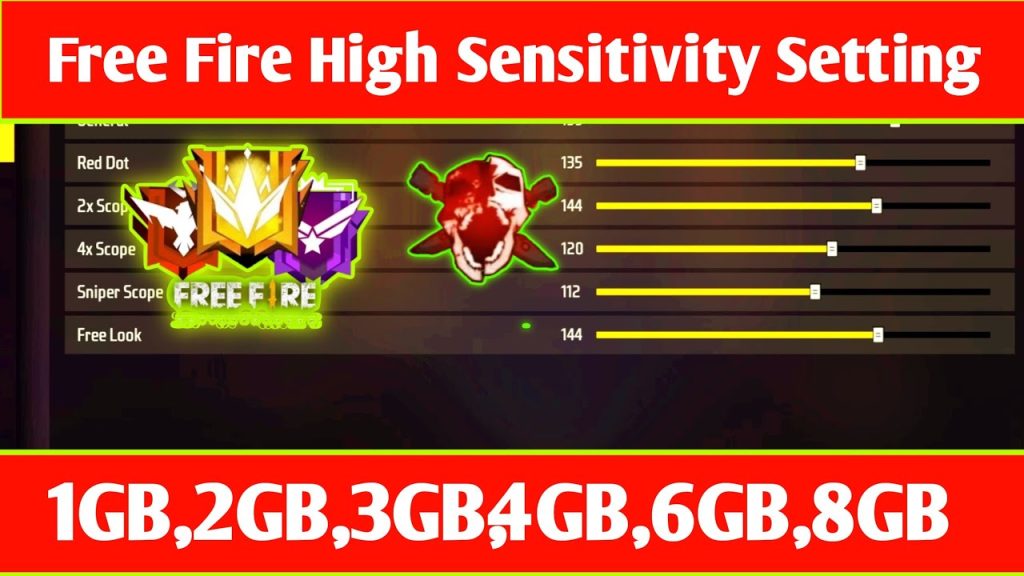
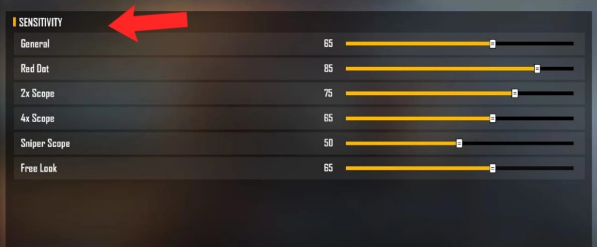
Instead of guessing, load a proven set of numbers. We recommend starting with the popular Free Fire sensitivity settings from our community guide. These are balanced for average ping and devices. For example, general sensitivity around 85–90, red dot 80–85, 2x scope 70–75, 4x scope 50–60, sniper scope 30–40, and free look 70. Write these down or screenshot the menu. This baseline will be your starting point for regional tuning.
Step 3: Adjust for Your Region’s Ping
Now, apply the following tweaks based on your average ping:
- Low ping (20–40ms, e.g., Southeast Asia): Lower all sensitivities by 5–10 points. You need less correction because response is near-instant. Try general 80, red dot 75, 2x 65, 4x 50, sniper 25, free look 65. This gives you pixel-perfect control. For aggressive close-range play, check out our free fire sensitivity settings for aggressive style, which dials up red dot for quick flicks.
- Medium ping (40–70ms, e.g., Europe): Keep baseline values mostly unchanged. General 85, red dot 80, 2x 70, 4x 55, sniper 30, free look 70. These work well for balanced gameplay.
- High ping (80–150ms, e.g., LATAM or parts of North America): Increase general and red dot by 5–10 points to compensate for lag. General 95, red dot 90, 2x 75, 4x 60, sniper 35, free look 75. Higher sensitivity helps your crosshair move faster to where you predict the enemy will be.

Step 4: Fine-Tune for Weapon Recoil Patterns
Every weapon behaves differently, and your sensitivity should match your primary guns. For AR users (like M4 or AK), higher general and red dot sensitivity helps control vertical spray. For SMGs (like MP40), lower scope sensitivity for close-range hipfire. Go to the training ground, pick your main weapon, and fire a full magazine at a wall. If the spray goes too high, lower your sensitivity slightly. If it’s too wobbly, increase it. For players who prefer not to use gyro, our free fire sensitivity settings without gyro guide gives pure touch adjustments. For device-specific tuning, like the best free fire sensitivity settings for Infinix, check that article if you own that brand.
Step 5: Test in a Custom Room with Friends
Don’t just tweak numbers—practice them. Create a custom room (or join one) and play 1v1 or team deathmatch with friends. Focus on flick shots, tracking, and spray transfer. If you notice you’re overshooting targets in close range, reduce red dot sensitivity. If you’re undershooting long-range snipes, increase sniper scope a bit. This is also a great time to try the free fire sensitivity settings for beginners 2026 if you’re new to the game—it’s designed to be forgiving while you learn. For those pushing to higher ranks, the free fire sensitivity settings for legendary rank configs are tested in competitive lobbies.
Common Pitfalls
- Copying pro settings without adjusting for ping: A pro in Thailand might use 75 general, but if you’re playing from Mexico with 120ms, that will feel sluggish. Always adjust up or down based on your ping.
- Changing too many settings at once: Tweak one slider at a time (e.g., only general) and test for 5 minutes before moving to the next. Big changes at once make it impossible to know what’s working.
- Ignoring DPI and device screen size: Sensitivity feels different on a 6-inch phone vs a 10-inch tablet. If you switch devices, redo the tuning. Similarly, higher DPI (e.g., gaming phones) may require lower sensitivity.
Where to Next
You’ve now got a region-optimized sensitivity that should improve your aim. The next step is to master it. Read our guide on free fire sensitivity settings for aggressive style if you prefer rushing enemies, or check out the free fire sensitivity settings without gyro guide if you’re on a device without gyro. For advanced users, the free fire sensitivity settings for legendary rank tutorial will help you climb the ladder. Keep practicing, and don’t be afraid to tweak as you get faster. Good luck out there!



