If you’re tired of feeling slow in Free Fire – like your enemies are always a step ahead – then you’ve come to the right place. This guide is for players who want to move faster, react quicker, and dominate the battlefield with snappy movement. Whether you’re a rusher or a flanker, having the right sensitivity settings can make or break your game.
By the end of this tutorial, you’ll have a set of sensitivity values dialed specifically for fast movement. You’ll know exactly which sliders to adjust, how to test them in real matches, and what to avoid. Let’s get moving – literally.
What You’ll Need
- A device running Free Fire (Android or iOS)
- Basic familiarity with the game’s settings menu
- Patience to test and tweak (no instant magic!)
Step 1: Access the Sensitivity Settings
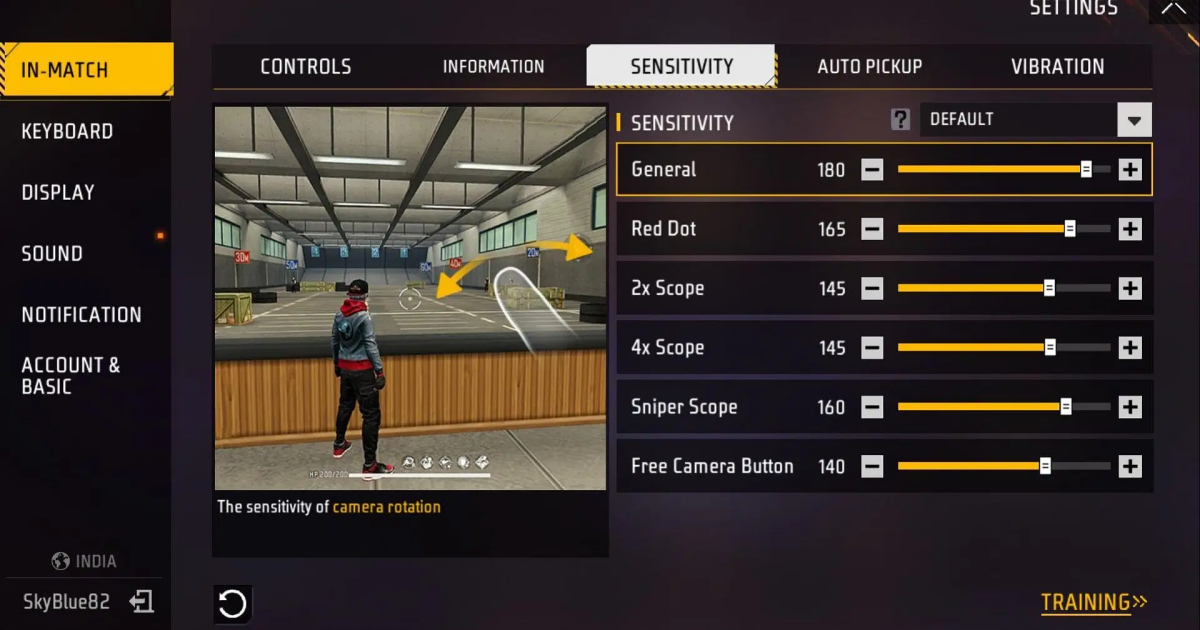
Open Free Fire and tap on the gear icon (Settings) on the home screen. Then select the ‘Sensitivity’ tab. Here you’ll see all the sliders: Camera, Gyroscope, and Aim. If you’ve never touched these before, don’t worry – we’ll start from scratch. For a more detailed walkthrough, check out our trusted sensitivity settings guide.
Step 2: Adjust Camera Sensitivity for Fast Turns
Camera sensitivity controls how fast your view rotates when you swipe. For fast movement, you want this high enough to do a 180° turn in one swipe. Start with 90-100 for General and Red Dot. For other scopes (2x, 4x, etc.), keep them at 70-80 so you don’t overshoot. These values work well for most players, but you can fine-tune using a sensitivity settings calculator to find your perfect number.
Step 3: Tweak Gyroscope Sensitivity for Micro-Adjustments
Gyroscope uses your phone’s tilt to aim. It’s great for fast, precise micro-adjustments without lifting your thumb. Enable gyroscope and set it to 50-70 for general and red dot. If your device has high touch sampling, you can push higher. For more tailored values, see our high touch sampling sensitivity settings guide.
Step 4: Fine-Tune Aim Sensitivity for Smooth Tracking
Aim sensitivity affects how fast you move while aiming down sights. For fast movement, keep it at 85-95 for red dot and 75-85 for 2x scope. This lets you track enemies without jitter. If you play on a low-end phone, check out our low end phone sensitivity settings – they’re optimized for stable performance.
Step 5: Test in Training Ground and Real Matches
Head to the Training Ground to practice your movement. Slide, jump, and turn quickly to see if your settings feel right. Then play a few matches – at least 5-10 – to really dial them in. Don’t forget to backup your sensitivity settings once you find your sweet spot, so you never lose them.
Common Pitfalls
- Overdoing sensitivity: Too high makes you jittery and inaccurate. Start moderate and increase gradually.
- Ignoring gyroscope: Gyro helps with fine movements; don’t turn it off completely.
- Not testing enough: One match isn’t enough. Play at least 5-10 games to adjust.
Where to Next
Now that you’ve got a fast movement setup, consider exploring more advanced techniques. Our daily player sensitivity settings can help you maintain consistency, and the sensitivity settings calculator lets you precisely compute your ideal values. Keep practicing, and you’ll be outmaneuvering everyone in no time!



