If you’re a Free Fire player in Bangladesh, you know the struggle: lag spikes, device overheating, and settings that just don’t feel right. Whether you’re on a budget Tecno, a mid-range Vivo, or a flagship Samsung, the right sensitivity can make or break your gameplay. This guide is for you—the motivated beginner who wants to stop spraying and start beaming. By the end, you’ll have a set of sensitivity values tested for Bangladesh’s network conditions and diverse devices, ready to copy and tweak.
We’ll walk through understanding your device’s DPI, setting up general sensitivity, fine-tuning aim & recoil, and testing in real matches. No jargon, just results. You’ll also get tips to avoid common mistakes that keep players stuck. Let’s dial in your aim and start winning more fights.
What You’ll Need
- Free Fire or Free Fire Max installed (latest version)
- Your phone model name (e.g., Tecno Camon 18, Vivo Y20, Redmi Note 10)
- A stable internet connection (4G or WiFi recommended)
- At least 30 minutes of free time for testing
- A friend to hop into a custom room for practice (optional)
Step 1: Know Your Device and DPI
Before you touch any sliders, find your phone’s DPI (dots per inch). Higher DPI means more sensitive touch response. For most devices in Bangladesh, DPI ranges from 320 to 480. You can check it using apps like ‘Display Info’ or ‘Device Info’. Knowing this helps you choose the right base sensitivity. For example, if your DPI is low (320), you’ll need higher in-game sensitivity to compensate.
Once you know your DPI, decide your playstyle. If you like to rush, you’ll want higher sensitivity for quick flicks. For passive play, lower sensitivity helps with precision. Check out our free fire sensitivity settings for rush gameplay if you’re aggressive. For now, note your DPI value—we’ll use it later.
Step 2: Set General Sensitivity
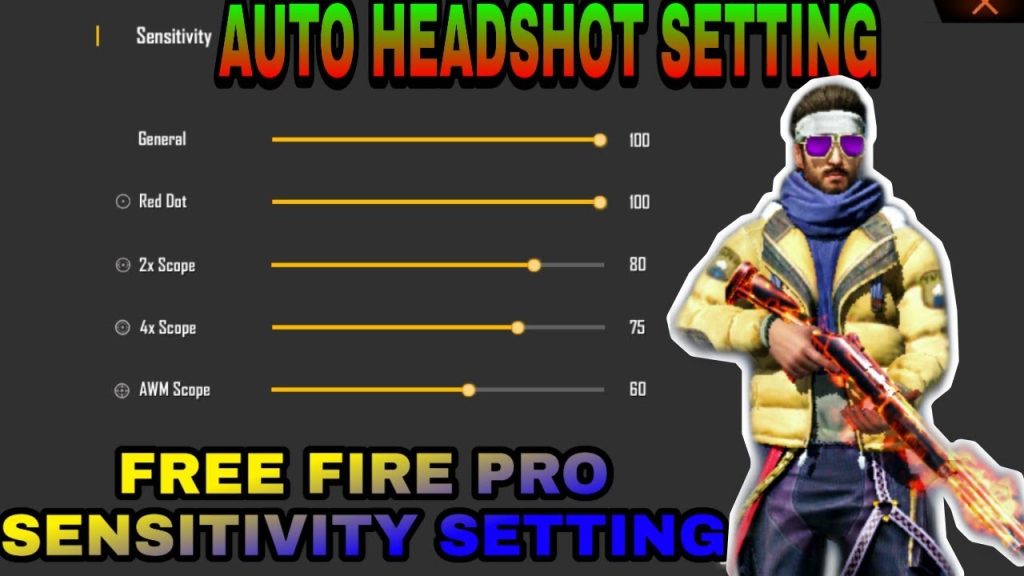
Open Free Fire, go to Settings > Sensitivity. Here’s a baseline for Bangladesh devices (adjust based on your comfort):
- General: 80-85 (if low DPI, go 90-100)
- Red Dot: 65-70
- 2x Scope: 50-55
- 4x Scope: 30-40
- Sniper Scope: 20-25
- Free Look: 50-60
These values work well for most scenarios. If you experience frame drops, consider using free fire sensitivity settings for frame drops to reduce jitter. Remember, higher sensitivity isn’t always better—too high and you’ll overshoot targets.
Step 3: Fine-Tune for Aim and Recoil Control
Now let’s reduce that spray. Recoil control relies on your ‘General’ and ‘Red Dot’ sensitivity. A common trick: set General between 80-90 and Red Dot around 70. This gives you enough speed to track targets while keeping recoil manageable. For long-range fights, lower your 4x scope to 35-40 to avoid over-correction.
If you want minimal recoil, check out our free fire sensitivity settings less recoil for tested values. Also, try advanced free fire sensitivity settings for competitive tweaks. After adjusting, head to the practice range and shoot at a wall—observe the bullet pattern and adjust until it’s tight.
Step 4: Test and Adjust in Real Matches
Sensitivity is personal. After setting baseline values, play a few Clash Squad or Classic matches. Focus on your aim: are you over-flicking? Under-tracking? If you miss shots consistently, tweak by ±5 points. For pro-level consistency, compare with free fire max sensitivity settings for pro players or scrim free fire sensitivity settings used in tournaments. Bangladesh players often prefer slightly higher sensitivity due to network latency—adjust accordingly.
Common Pitfalls
- Copying pro settings blindly – Pros use high-end devices with 90+ FPS. Your low-end phone may lag with their settings. Always start with your own baseline.
- Ignoring device performance – If your phone heats up, lower sensitivity and graphics. Use ‘Ultra’ graphics only if you have good cooling.
- Not adjusting for network lag – High ping makes aim feel floaty. If you have frequent spikes, reduce sensitivity by 5-10 points to maintain control.
Where to Next
You’ve got the base settings. Now practice consistently and fine-tune as you improve. For more advanced techniques, read our guides on peek shots, crouch-spraying, and DPI tricks. Remember: sensitivity is a journey, not a destination. Keep tweaking, keep dominating. See you on the battlefield!



