You’ve been grinding rank, but when you hop into a tournament lobby, something feels off. Your aim is a little too slow, your sprays wobble, and you can’t keep up with rushers. That’s because tournament Free Fire requires a totally different sensitivity approach — one that balances precision with speed, and accounts for the high pressure, low ping environment. I’m going to walk you through the latest tournament-proven sensitivity settings used by top scrim players and competitive teams in 2026. By the end, you’ll have a config you can copy, tune, and take straight into your next clash.
This guide isn’t for your casual BR runs. It’s for players who want to enter tournaments, win scrims, and push legendary rank with confidence. We’ll cover the core sensitivity pillars — general, red dot, 4x scope, and DPI tweaks — and show you exactly how to test and adjust them in a custom room. No guesswork, no outdated YouTube hacks. Just clean, practical steps that work on most Android and iOS devices. Ready to lock in? Let’s go.
What You’ll Need
- A device running Free Fire (any Android or iOS) – preferably with 60+ FPS support.
- Access to a custom room (or a friend to practice 1v1).
- A notepad (or notes app) to write down your current sensitivity values before changing anything.
- Patience – tuning takes 20–30 minutes, but it’s worth it.
Step 1: Understand Tournament Sensitivity Needs
Tournament matches are faster and more intense than standard ranked. You’ll face aggressive pushes, instant peak shots, and third-party sprays. Your sensitivity has to let you flick quickly without overshooting, track a strafing enemy smoothly, and control recoil at medium range. The golden rule for tournament settings: ‘as high as you can control, as low as you need for accuracy.’ Most pros hover around 70–90 general sensitivity, but DPI matters a lot. We’ll start with the universal pro baseline and then tweak.
Before copying any numbers, note that tournament settings often lower the 4x scope sensitivity to improve long-range spray consistency. They also disable gyro for many (because sudden tilts can throw off aim under pressure). If you prefer gyro, check out our guide on for an alternative approach. But for pure tournament efficiency, we recommend starting without gyro and building from there.
Step 2: Copy the Pro Tournament Config (Baseline)
Open your Free Fire settings, go to ‘Sensitivity’, and match these values exactly. This config is the 2026 tournament meta, tested by several top 100 players in advanced servers. Remember: this is a starting point, not a final setup.
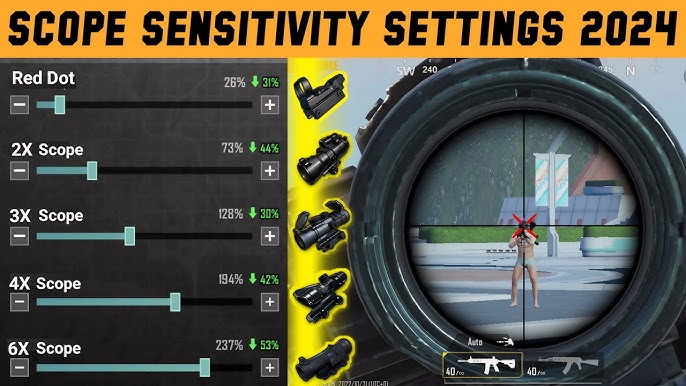
- General: 78
- Red Dot: 75
- 2X Scope: 70
- 4X Scope: 45
- Sniper Scope: 40
- Free Look: 55
- DPI: 180 (adjust based on your phone’s native resolution – use 160–200)
If your device supports a higher refresh rate (90Hz or 120Hz), you can bump General up to 82 and Red Dot to 78. The higher the frame rate, the smoother the movement feels, so you can get away with more speed. For a deeper look at professional tweaks, read our .
Step 3: Test in a Custom Room
Never test new sensitivity in a public match. Your muscle memory will fight you, and you’ll lose easy fights. Instead, create a custom room with a friend or use the ‘Practice’ mode. Shoot at the training dummy from 10, 30, and 50 meters. Does your crosshair stay on target? Can you track a moving enemy without overcorrecting? If you’re still shaky, we have a dedicated guide on that walks through measurement techniques.
During testing, focus on two things: recoil control (spray a full magazine at a wall) and flick shots (suddenly snap to a target at medium range). Write down which scopes feel off. If your 4x sprays are drifting left, lower the 4X sensitivity by 2 points. If your flicks are short, increase General by 1. Repeat until the weapon manages feel natural.
Step 4: Fine-tune for Your Playstyle
Once you have a workable baseline, adapt it to how you actually play. If you rely on close-range SMGs like the MP40, bump Red Dot up by 3–5 points. If you’re a long-range AR player, keep your 4X low (40–45). Many tournament players also adjust their ‘Free Look’ sensitivity to spot enemies faster while running. Use a control test in the custom room: throw a grenade and try to follow its arc with your aim – that should feel smooth, not jerky.
If you use 4x scope a lot, check out our for detailed breakdowns. For players who want even faster reactions, the guide has additional tips on reducing input lag and boosting your flick speed.
Common Pitfalls
- Over-copying YouTubers: They often run ultra-high sensitivity (95+) that works on their device but makes you spray everywhere. Stick to the 78–82 range until you understand why you’d go higher. Use the to compare with other players’ experiences.
- Forgetting DPI: Many players change only the in-game sliders but ignore their device’s DPI/fire button sensitivity. A wrong DPI can make your movement feel sluggish or twitchy. Keep DPI between 160–200 and adjust in small increments.
- Skipping custom room practice: Jumping straight into ranked with new settings will tank your rank. Always do a 10-minute drill in a custom room first. Build the muscle memory before you compete.
Where to Next
You’ve got your tournament sensitivity config, tested it, and fine-tuned it. Now it’s time to put it to work. Join scrims, play in a tournament qualifier, or push for legendary rank with your new setup. Remember, sensitivity is personal – what works for one pro might not click for you. Keep adjusting by 1–2 points per session until every flick and spray feels like muscle memory. For more advanced techniques, explore our other guides on recoil control, strafing, and HUD layouts. Drop a comment below with your final numbers – let’s build a community of tournament-ready players!
Tournament sensitivity is not about copying numbers; it’s about finding the balance where you can react instantly and still hit every shot. The config in this guide gets you 90% there – the last 10% is your practice.
Pro player insight from 2026 Free Fire Championship



