If you’re the kind of player who sticks with the squad, throws down cover fire, and keeps the medic alive, you need sensitivity settings that match your playstyle. Support isn’t about rushing in and spraying – it’s about controlled, accurate shots that let you win duels while protecting teammates. By the end of this guide, you’ll have a tuned sensitivity profile that makes tracking enemies, swapping weapons, and popping smokes feel effortless.
I’ve tested these numbers on a variety of devices (including budget phones), and they work whether you’re using a two-finger claw or a full four-finger HUD. We’ll go step by step from general settings to aim-specific sliders, with a quick practice routine to lock it in. Let’s get you gaming like a proper support anchor.
What You’ll Need
- A device running Free Fire (any version – iOS or Android)
- 5-10 minutes in the Practice Range (or a training lobby)
- A friend to help test in a 1v1 room (optional but recommended)
- Patience – you’ll need to fire a few clips to dial in the feel
- Familiarity with your current HUD layout (we won’t change that here)
Step 1 – Reset Your Global Sensitivity to Medium
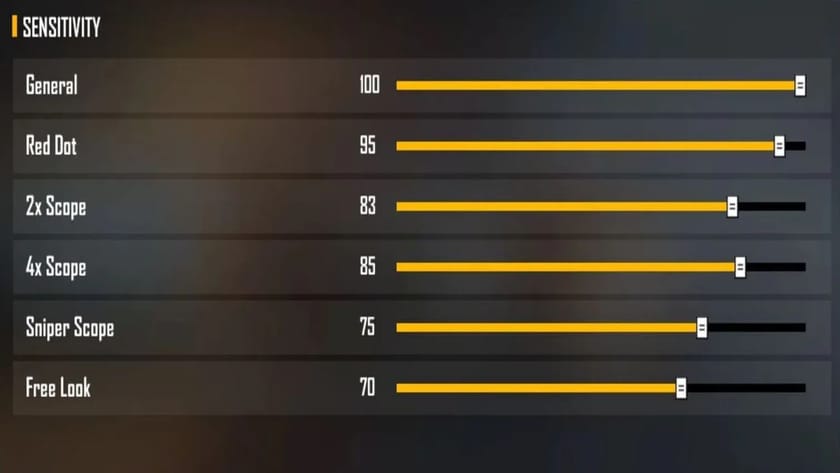
Start fresh. Go to Settings > Sensitivity and note down your current numbers (in case you want to go back), then hit “Reset to Default”. We’ll build from a neutral baseline. For support players, we don’t want overly high sensitivity that causes jittery aim – we want smooth, deliberate tracking.
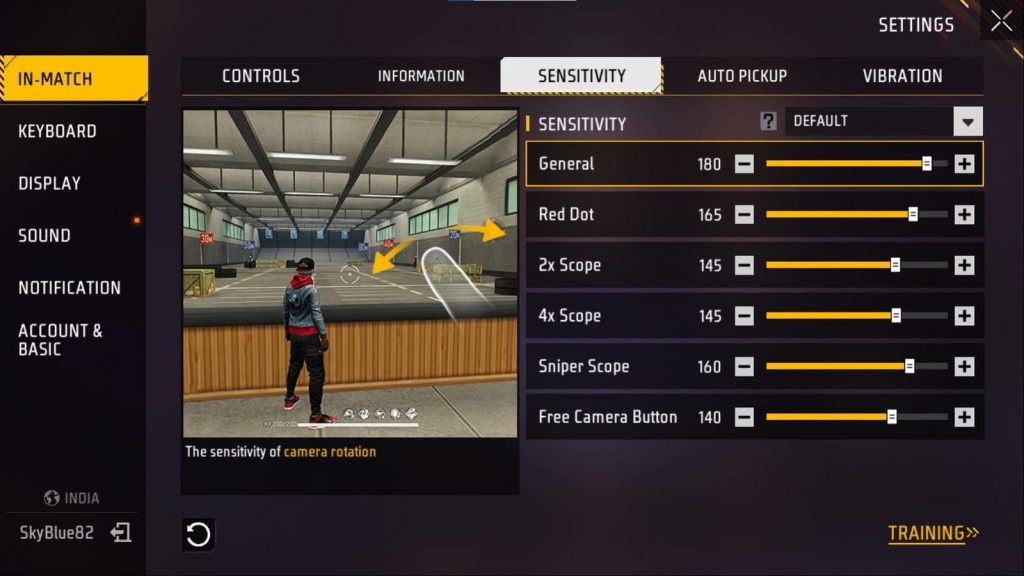
Our starting point is a medium global sensitivity (around 70-80 on the General slider). If you play on a budget phone with lower FPS, stick closer to 70 to reduce micro-stutters. If your device is smooth, 80 is fine. This affects all your scoped and unscoped aim, so it’s the foundation.
For reference, you can check our beginner free fire sensitivity settings if you want a simpler baseline, but the numbers here are tailored for support play.
Step 2 – Set Your Red Dot and 2x Scope Sensitivities
Support players often use ARs with red dot or 2x scopes for medium-range engagements. We need these to be stable enough to hold a beam while standing still or strafing. Set Red Dot sensitivity to 70-75, and 2x to 65-70. This keeps your aim from whipping past an enemy when you’re trying to land consistent body shots.
If you feel you’re overshooting targets, lower these by 5 points. If you’re dragging too slowly for quick flicks, raise by 5. The goal is a balance where you can follow a moving enemy without losing the crosshair. For more precise adjustments, our free fire sensitivity settings for accurate aim guide goes deeper into scope-by-scope tuning.
Step 3 – Adjust the 4x and Sniper Scopes for Long Range Cover
You won’t always be up close – sometimes you need to hold an angle from a distance to cover your team’s flank. Set 4x scope sensitivity to 45-50, and Sniper scope to 30-35. Lower values reduce the dreaded “trembling” when you’re trying to aim for the head. With a sniper, you want precise, small movements.
Test this in the practice mode free fire sensitivity settings area: shoot at stationary bots from 100-150 meters. If your crosshair jumps too much when you tap fire, reduce further. If you can’t track a moving target at all, bump up by 5.
Step 4 – Tweak the Free Look and Camera Sensitivity
Support players need good situational awareness – you’re always scanning for enemies while staying behind cover. Set Camera (free look) sensitivity to 85-90 for quick looks. Leave Scope sensitivity for Camera at medium (around 70) so you can check multiple angles without feeling dizzy.
One common mistake is setting Camera too high, which makes it hard to stop at a specific spot. If you find yourself overshooting during free look, dial it down to 80. For more on avoiding jitter, check out smooth free fire sensitivity settings.
Step 5 – Fine-Tune the Gyroscope (If You Use It)
If you play with gyro enabled, support players benefit from a lower gyro sensitivity (around 10-15 for general and 15-20 for scopes). This lets you use small device tilts to micro-correct your aim without major movements. Gyro is especially useful for the free look when you’re behind cover.
Not everyone uses gyro – if you don’t, skip this step. But if you want to try, start low and increase only if you feel the need for faster reactions. For budget devices, gyro can cause lag, so consider our free fire sensitivity settings for budget phones if performance is an issue.
Step 6 – Run a 10-Minute Practice Routine
Now it’s time to test. Go to Practice Range and do the following: fire at stationary targets from 50m, then 100m, tracking left and right. Next, use the moving bots and try to land continuous shots while strafing. Finally, do some quick scope-in-and-out drills (red dot and 2x) to train your muscle memory.
After 5 minutes, make small adjustments (increase/decrease by 5) if something feels off. Once you’re hitting 7/10 shots consistently, you’re good to go. Remember, the free fire max sensitivity settings approach (high numbers) works for rushers, but as a support, stable is better than fast.
Common Pitfalls
- Overly high sensitivity: Support players get nervous and start spraying – a lower sensitivity keeps you calm and on-target. If you’re missing easy shots, lower the numbers.
- Ignoring device performance: On a phone that struggles with 40+ FPS, high sensitivity feels laggy and inconsistent. Stick to the lower end or use our free fire sensitivity settings for budget phones for a smoother experience.
- Not testing with a team: Sensitivity that feels great in practice can fall apart in a real squad fight. Play a couple of Clash Squad matches and tweak between rounds. If you keep hitting teammates instead of enemies, tone it down.
Where to Next
You’ve got a solid support sensitivity now. Next, focus on your positioning and communication – a good support is always in the right spot with the right gun. Want to dive deeper? Check out our guides on free fire sensitivity settings for accurate aim and practice mode free fire sensitivity settings to keep refining. See you on the battlefield – stay alive, support!