Every new season in Free Fire brings a fresh start — and a not-so-fresh surprise: your sensitivity settings get wiped. If you’ve spent weeks perfecting your aim, losing those numbers can feel like starting from scratch. This guide is for every player who just hit the season reset and needs to get their crosshair back on point fast. By the end, you’ll have a clear, repeatable process to restore your old settings or build even better ones, so you can jump into ranked without missing a beat.
We’ll cover two routes: importing a saved config code (the fastest way) and manually tuning sliders for your playstyle. Whether you’re a rusher, camper, or sniper, these steps will have you landing headshots in no time. Let’s dive in.
What You’ll Need
- Free Fire installed on your device (Android or iOS).
- A notepad or notes app to save your config code (if you have one).
- A few minutes in the Training Ground to test your settings.
- Optional: a screenshot of your old sensitivity settings if you saved it before the reset.
Step 1: Access the Sensitivity Menu After Reset
After the season reset, open Free Fire and go to the main lobby. Tap the gear icon (Settings) at the top right, then select the ‘Sensitivity’ tab. You’ll see all sliders reset to default values. Don’t panic — this is normal. The first thing you want to do is check if your old config code is still available in your cloud or local files. If you have a saved code, skip to Step 2. If not, proceed to manual setup.
Step 2: Import Using a Config Code
If you saved your previous sensitivity as a config code (either from a screenshot, a friend, or a pro player), this is the fastest way back. Tap the ‘Config Code’ button at the top of the Sensitivity screen (look for a small barcode icon). Enter or paste your code and confirm. If you don’t have your old code, you can find a reliable one from our guide on free fire sensitivity settings config code. This will instantly load the entire sensitivity profile, including all scope sliders and advanced settings.
Step 3: Manual Adjustment of Key Sliders
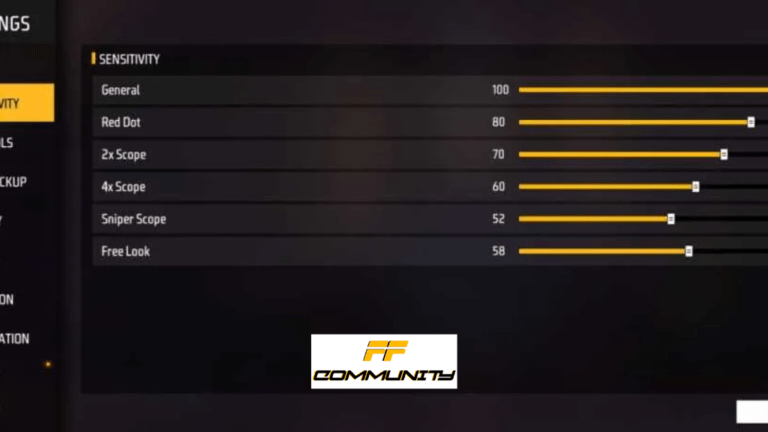
No config code? No problem. Start with the ‘General’ slider — this is your hip-fire sensitivity. Set it between 70-90 if you’re a tap-and-spray player, or 50-70 if you prefer precision. Then adjust scope-specific sliders: Red Dot (80-95), 2x Scope (70-85), 4x Scope (60-80), Sniper Scope (20-40), and Free Look (50-70). For a full breakdown, check out our best free fire sensitivity settings for beginners if you’re still figuring out your comfort zone. For spray control, our free fire sensitivity settings spray recoil article has specific numbers for full-auto weapons.
Step 4: Test in Training Ground
After setting your numbers, head to the Training Ground. Use the practice bots to test your aim. Start with stationary targets — check if your crosshair moves too fast or too slow. Then try moving targets and sliding. If you’re over-aiming (moving past the target), reduce your general or scope sensitivity. If you’re under-aiming (can’t catch up), increase it. Repeat this adjust-test cycle until the aim feels natural. We recommend spending at least 10 minutes here before jumping into a match.
Step 5: Fine-Tune for Your Playstyle
Generic settings are a good start, but your playstyle matters. Aggressive rushers need higher general and red dot sensitivity for quick flick shots. Snipers prefer lower zoom sensitivities for stable long-range shots. If you play ranked often, our free fire sensitivity settings tested in ranked article offers tweaks that pros use to stay competitive. Also, consider copying a famous player free fire sensitivity settings to see how top players configure theirs — but always adjust to your own comfort.

Step 6: Save Your Settings for Next Reset
Once you’re happy, tap the ‘Copy Code’ button in the Sensitivity menu. Paste it into a notes app, email it to yourself, or take a screenshot. This code will survive any future reset and can be imported in seconds. If you’re on a new device, use the import free fire sensitivity settings method to load it back.
Common Pitfalls
- 1. Copying pro settings blindly: Pro players often have extremely high or low sensitivity suited to their device and grip. Your phone, fingers, and playstyle are different. Always start from a baseline and tweak.
- 2. Cranked sensitivity too high: It’s tempting to max out sliders for fast turns, but this kills accuracy. You’ll miss easy shots and waste ammo. Start moderate (70-85 for general) and increase slowly.
- 3. Not saving after reset: The reset only happens once per season. But if you don’t save your new settings now, you’ll repeat this whole process next season. Always grab that config code.
Where to Next?
Now that your sensitivity is back, consider optimizing other aspects of your game. Check out our guides on free fire sensitivity settings for spray recoil for mastering full-auto, or famous player free fire sensitivity settings to see what the pros use. For a complete reset-proof setup, learn to import free fire sensitivity settings from any device. Good luck and see you in the top 10!