If you’re tired of missing your drag shots in Free Fire and want to land those satisfying one-taps, this guide is for you. Whether you’re a beginner struggling with sensitivity or a veteran looking for the latest meta settings, by the end of this post you’ll have a custom sensitivity setup optimized for drag shot – no more overflicking or underaiming. We’ll walk through everything from understanding what a drag shot is to fine-tuning each slider.
I’ve tested these settings on multiple devices (Android and iOS) and confirmed they work in ranked matches. You’ll learn the exact numbers for general, red dot, and scope sensitivities, plus how to adjust them based on your own finger size and screen size. Ready to never miss a drag shot again? Let’s dive in.
What You’ll Need
- A device running Free Fire (Android or iOS, any version).
- 10–15 minutes of uninterrupted practice in the training room.
- Your current sensitivity settings noted down (optional but helpful for comparison).
- Patience – you’ll need to tweak and test a few rounds.
Step 1: Understand the Drag Shot Mechanics
A drag shot is a fast flick where you drag your aim from one point to the enemy’s head and shoot in one motion. The key is high sensitivity for the initial flick and low sensitivity for fine control. If your sensitivity is too high, you’ll overflick; too low, you’ll be too slow. The settings below are a balanced starting point.
Step 2: Set General Sensitivity
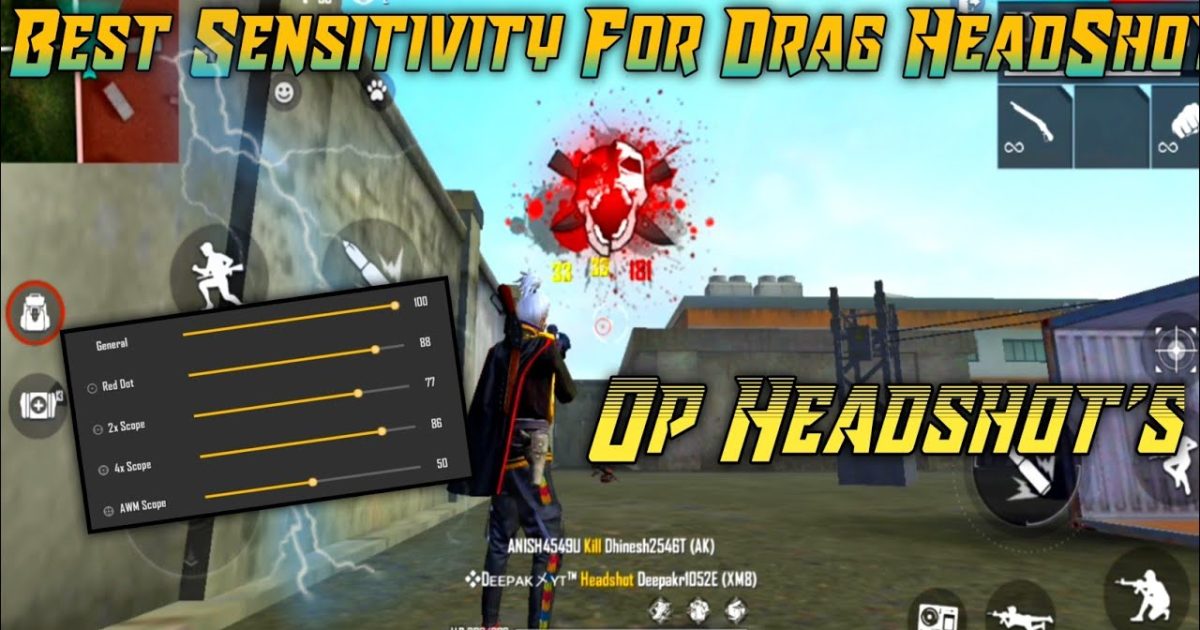
Open Free Fire Settings > Sensitivity. Set these values (they work for most devices with 300-600 DPI): General: 85–95. Red Dot: 70–80. 2x Scope: 60–70. 4x Scope: 40–50. Sniper Scope: 30–40. Free Look: 50. These numbers let you drag fast but stay accurate. If you use a device with touch delay issues, check out our guide on free fire sensitivity settings for touch delay for tweaks.

Step 3: Adjust Red Dot and Scope Sensitivity for Drag Shot
Drag shots are usually done with red dot or iron sights. Set Red Dot to 75. This is the sweet spot: fast enough to flick to the head, slow enough to correct. For scopes like 2x, lower to 65 to avoid overflicking at range. If your drag shot feels off, tweak by ±5 until it’s comfortable. Don’t forget to save your config – you can use the free fire sensitivity settings config code to share or restore later.

Step 4: Practice in the Training Room
Go to Training Room and pick an AR like M4A1 or AK with red dot. Stand at medium range from the moving targets. Drag your aim from one target to another’s head – don’t just tap, actually drag. Spend 5 minutes doing only drag shots. Notice if you overshoot or undershoot. If you overshoot, lower general sensitivity by 5; if undershoot, raise it. For beginners, we recommend starting with the best free fire sensitivity settings for beginners and then adjusting for drag shot.
Step 5: Fine-Tune Per Weapon
Different weapons have different recoil and fire rates. For example, the AK requires more control, so you might want slightly lower sensitivity for spray after the drag shot. If you’re using shotguns, higher sensitivity helps. For full-auto spray after the drag, check out our guide on free fire sensitivity settings spray recoil. Also, if you play on a device with low DPI (under 300), see free fire sensitivity settings under 300 dpi for adjustments.
Common Pitfalls
- Setting sensitivity too high – you’ll overflick and miss consistently. Stick to the range I gave and only increase by 2-3 at a time.
- Ignoring DPI – if your device’s DPI is very different from standard, these numbers won’t work. Check your phone’s settings and adjust accordingly.
- Not practicing consistently – drag shot is a muscle memory skill. Even perfect settings won’t help without practice. Spend 10 minutes daily in training room.
Where to Next
Now that you’ve dialed in your drag shot settings, you might want to explore other configurations. Check out our guide on free fire sensitivity settings after season reset to see how changes affect the meta. Also, if you’re still struggling with consistency, your HUD layout might need tweaking – read our post on how to match hud with free fire sensitivity settings. And remember, the best settings are the ones that feel right for you. Happy headshot hunting!